If a “domain registration compliance” email has recently landed in your inbox warning that your domain is non-compliant or at risk of suspension, you’re not alone and you’re right to pause before acting on it.
A wave of these notices is going out across Australia at the moment. Some are genuine and worth acting on. Others are vague, automated and confusing, and a few reference domains the recipient doesn’t even own, or that aren’t with the registrar sending the notice. This guide explains what .au domain compliance actually is, why you might be hearing about it now, how to tell a clear notice from a poor one, and exactly what you can check yourself before you do anything.
What “domain registration compliance” actually means
Every .au domain is issued under rules set by auDA, the body that administers Australia’s domain space. Each namespace has its own eligibility requirements:
| Namespace | Who can hold it | Typical eligibility |
| .com.au / .net.au | Australian commercial entities | Active ABN or ACN, or an Australian trademark matching the domain |
| .org.au | Not-for-profit entities | Registered non-commercial organisation |
| .id.au | Australian individuals | Australian citizen or resident |
| .au | Any Australian person or entity | Verifiable Australian presence |
Compliance simply means the registration details on your domain still satisfy those rules. If the ABN used to register a .com.au is cancelled, or the registrant details no longer match the eligibility criteria, the domain is no longer compliant and that can put your renewal at risk.
Registrars (the companies you register and renew domains through) are obligated to check eligibility at three points: at registration, at transfer, and at renewal. If something doesn’t meet the rules at one of those points, your registrar should contact you to clarify or correct it.
Why you might be receiving these emails now
The modernised and consolidated .au licensing rules came into effect in 2021, but enforcement has been uneven. While all registrars have been validating at registration since then, many larger registrars are only now beginning to actively check and act on eligibility at renewal.
That’s why a domain you’ve held without issue for years can suddenly trigger a compliance notice. Nothing about your domain has necessarily changed, the registrar it sits with has simply started enforcing rules that were always there, and that they’re obligated to enforce under their agreement with auDA.
So if a notice has caught you by surprise, that timing is the likely explanation. It doesn’t automatically mean the notice is wrong, but it does mean it’s worth checking carefully rather than acting under pressure.
Clear notice or poor notice? How to tell
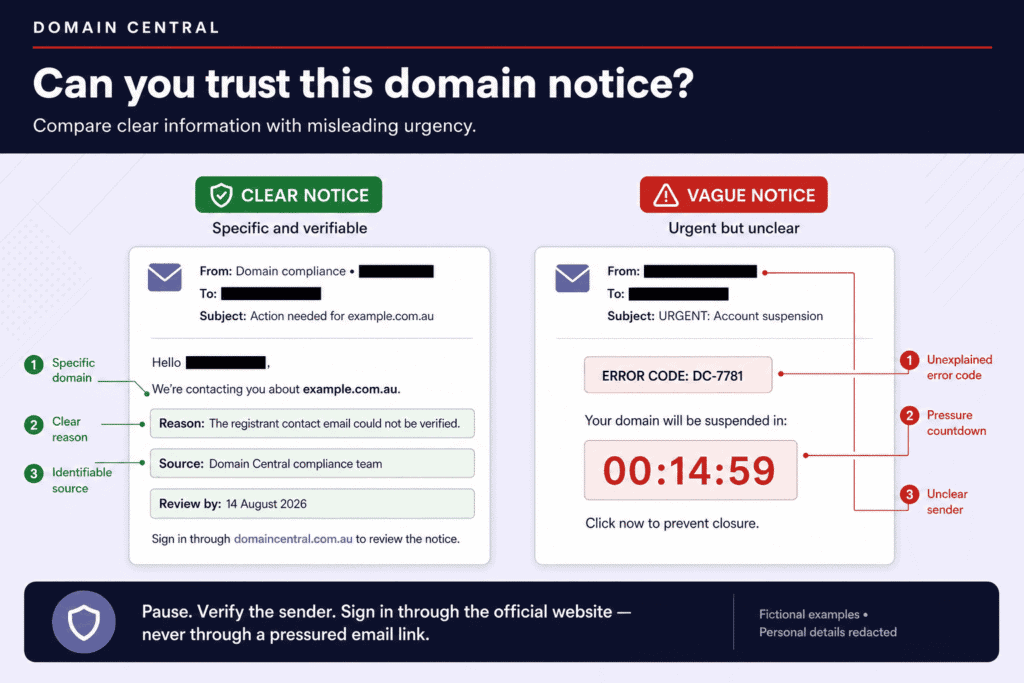
A good notice leaves you in no doubt about what the problem is and what to do. A poor one leaves you guessing. Here’s the difference at a glance:
| A clear, legitimate notice… | A poor or questionable notice… |
| Names the exact domain, one you recognise and hold | Refers to a domain you don’t own or don’t recognise |
| States specifically what is non-compliant, and why | Quotes a raw system error code with no plain-English explanation |
| Explains your options, including any costs | Is vague about what you’re expected to do or pay |
| References the relevant auDA rules so you can verify | Cites no source you can check independently |
| Gives an honest timeframe | Uses an artificial countdown to create urgency |
| Makes clear which registrar sent it | Leaves the sender’s identity ambiguous |
A notice showing one or two of these warning signs isn’t necessarily a scam, but it does mean you should verify before paying anything or sharing details.
As an illustration, a clear notice reads something like this:
Dear Client,
Your domain [domain] is due for renewal on [date].
A validation check on the current WHOIS information shows that the ABN [ABN] used as eligibility to register this domain was cancelled on [date], which means you are no longer eligible to hold the domain under auDA rules, and the upcoming renewal will fail.
You have two options to maintain your registration: reactivate the ABN, or update the registrant details to an eligible entity by completing a Change of Registrant (which may require a supporting chain of title) before expiry.
A Change of Registrant costs [amount].
For the full eligibility requirements, see the auDA licensing rules.
Notice what that does: it tells you the specific problem, the specific cause, your specific options and the cost, and it points you to the source. You can act on it with confidence because nothing is hidden.
What you can check yourself
Before you respond to any compliance notice, you can confirm your own situation in a few minutes:
- Confirm it’s your domain. Check the domain named in the email is one you actually hold, and that it appears in your account with your current registrar.
- Check your ABN or ACN is current. If your eligibility was based on an ABN, look it up on the ABN Lookup register. A cancelled or lapsed ABN is the most common genuine cause of a .com.au compliance issue.
- Check the registrant details on the domain. Look up the public registration details of any .au domain through the official auDA WHOIS tool. This shows what’s currently on record and whether it still meets the rules.
- Contact your registrar directly. Use the contact details from your own account or the registrar’s official website, never a link or phone number from a suspicious email.
That last point matters. Treating an unexpected email with caution, and verifying through channels you already trust, is the same instinct that protects you from phishing generally.
If everything checks out and the issue is real, the fix is usually either reactivating a lapsed ABN or completing a Change of Registrant.
A quick word on Change of Registrant
One thing that catches people out: correcting eligibility is often not a simple “update my details” edit in a portal. If the registrant entity itself needs to change, a different ABN, ACN, trademark or incorporated body, that’s a formal Change of Registrant: a paid, documented process rather than a quick field update. A clear notice will tell you this upfront, including the cost, so there are no surprises.
Frequently asked questions
Is a domain compliance email always a scam? No. Many are genuine, and registrars are obligated to check eligibility. But some are poorly targeted or unclear, so verify before you act.
What’s the most common reason a .com.au becomes non-compliant? A cancelled or lapsed ABN. Business structures change, and the ABN used for eligibility years ago may no longer be active.
What happens if I ignore a genuine notice? Your renewal may fail, and you risk losing the domain. If a notice checks out as legitimate, act on it before expiry.
Can I just update my details online to fix it? Sometimes. But if the registrant entity itself is changing, it requires a formal Change of Registrant, which is a paid process with supporting documentation.
How we approach it at Domain Central
We think compliance notices should make your life easier, not harder. Rather than waiting for a renewal to fail, we proactively scan upcoming renewals, identify domains that would fail eligibility, and contact the registrant ahead of time, spelling out exactly which detail is non-compliant and what the options are. No error codes, no countdowns, no guesswork.
If you’ve received a compliance notice from your current registrar and you’re left guessing what it means, that’s worth reflecting on. You’re entitled to a registrar that tells you precisely where you stand and helps you fix it. If that’s not the experience you’re having, you’re always free to transfer your domain to us and bring it somewhere that communicates clearly.
In the meantime, the most important thing is this: don’t act on any compliance notice under pressure. Check the domain is yours, check your ABN is current, look up the details on the auDA WHOIS, and confirm directly with your registrar. A genuine issue will still be there after you’ve taken ten minutes to verify it and a misleading one will be a lot easier to spot.
Domain Central is an accredited auDA and ICANN registrar. For the full .au eligibility and allocation rules, see the auDA licensing policy.