Disclaimer: This is general information, not legal advice. For guidance on your obligations, visit oaic.gov.au or speak to a qualified adviser.
Every year on 28 January, Data Privacy Day highlights something most of us rarely stop to think about: how much of our personal information is out there, and how little control we often have over it.
As part of our 101 series, this guide explains what data privacy actually means, why it matters for individuals and businesses in Australia, and the practical steps you can take today to protect yourself.
What is data privacy?
Data privacy is your ability to control when, how and to what extent your personal information is shared with others.
Under Australian law, not all information is treated equally. It’s worth knowing the difference, because sensitive information carries stronger protections:
| Type | Examples |
| Personal information | Name, address, phone number, email, date of birth, online activity |
| Sensitive information | Health records, biometrics, racial or ethnic origin, religious or political views, sexual orientation, criminal record |
The more of this that circulates without your knowledge, the more exposed you are.
Why data privacy matters
When personal data isn’t kept private, it can be misused in several ways:
- Fraud and identity theft: criminals use your details to impersonate you, open accounts or target you with convincing scams.
- Unwanted tracking and marketing: companies may sell your information to advertisers or data brokers without meaningful consent.
- Chilling effects on free expression: being constantly monitored changes how people behave, particularly under repressive regimes.
For businesses, the consequences go further: a privacy breach can mean lasting reputational damage, lost customers and regulatory penalties. And many people argue privacy has intrinsic value too, that, like freedom of expression, it’s a right a free society depends on.
The Australian context: what the law expects
Australia’s Privacy Act 1988 sets out how organisations must handle personal information, through the Australian Privacy Principles. A few developments are worth knowing about:
- The Notifiable Data Breaches scheme requires covered organisations to notify both affected individuals and the Office of the Australian Information Commissioner (OAIC) when a breach is likely to cause serious harm.
- The Privacy and Other Legislation Amendment Act 2024 introduced stronger enforcement powers, including infringement notices for administrative failures such as not having a compliant privacy policy.
- Since June 2025, individuals can sue directly over serious invasions of privacy. Importantly, this applies regardless of the small business turnover exemption, so even sole traders should take reasonable care with other people’s data.
Smaller businesses under the $3 million turnover threshold are currently exempt from many Privacy Act obligations, though further reforms may change that. If you handle customer data, it’s worth checking your position on the OAIC website.
Simple ways to protect your data today
The risks sound daunting, but most of the protection comes from a handful of habits:
| Action | Why it matters | Effort |
| Use unique passwords for every account | One breach can’t unlock everything else | Low |
| Turn on multi-factor authentication | Stops attackers even if a password leaks | Low |
| Set devices to auto-lock | Protects you if a phone is lost or left behind | One-off |
| Enable biometric unlock | Adds a strong extra barrier on phones and apps | One-off |
| Automate software updates | Security patches close known vulnerabilities | One-off |
| Review app permissions | Stops apps collecting data they don’t need | Medium |
| Avoid sensitive tasks on public Wi-Fi | Shared networks can expose what you’re doing | Low |
A few of these deserve a little more explanation.
Passwords and MFA. Reusing passwords is the single most common weak point. Even a strong password becomes a liability if it’s shared across accounts: one leak, and every account using it is exposed. A password manager solves this by generating and storing unique passwords for you. Our Password 101 guide covers this in detail, including multi-factor authentication and passkeys.
Public Wi-Fi. General browsing on a café or airport network is usually fine, but avoid internet banking, work systems or anything involving sensitive information. If you regularly need to work on public networks, a VPN is worth considering.
VPNs, choose carefully. A VPN (Virtual Private Network) routes your traffic through an encrypted connection, so others on the network can’t see what you’re doing. But be cautious with free VPNs: running one is expensive, and many recoup the cost by logging and selling the very browsing data you’re trying to protect. Look for a reputable paid provider with a clear, independently audited no-logs policy.
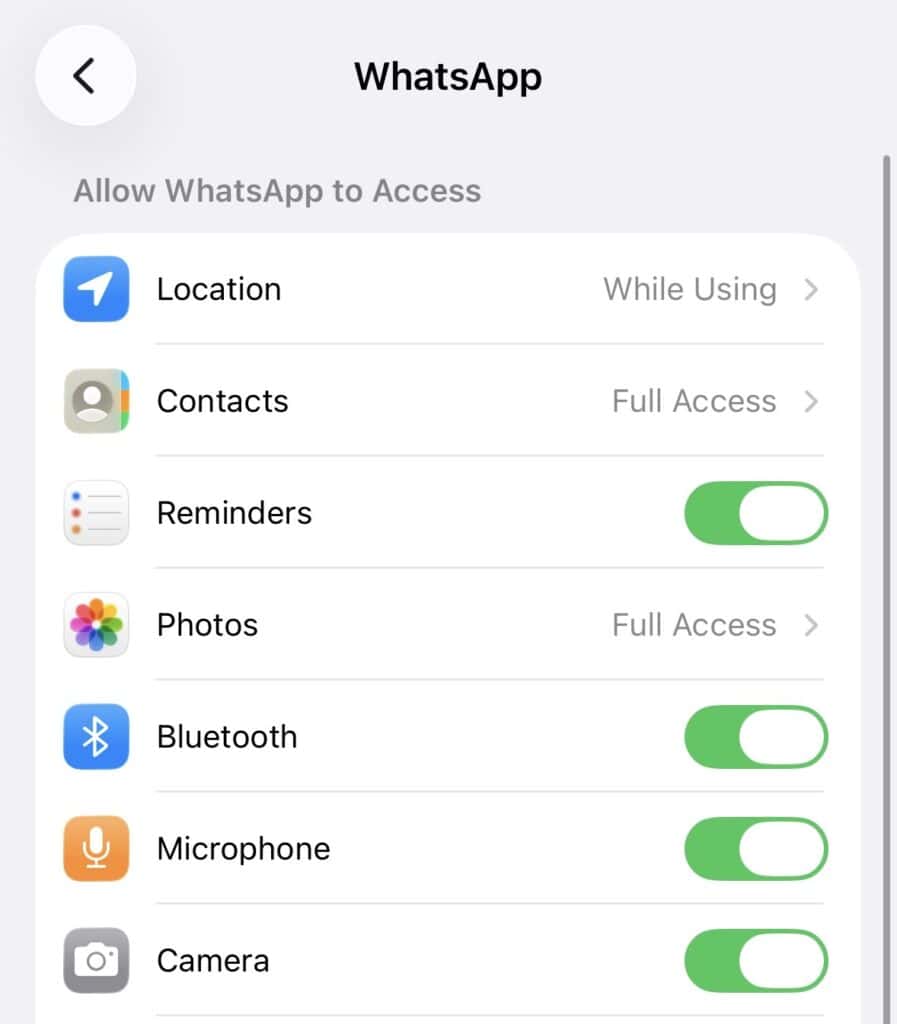
App permissions. Most of us use a smartphone as our main device, which makes app permissions a genuine privacy setting. Check periodically which apps have access to your location, camera, microphone and contacts, and switch off anything that isn’t necessary.
If you run a business or website
Handling other people’s data raises the bar. A few essentials:
- Install an SSL certificate. It encrypts data between your visitors and your site, so information submitted through forms or checkouts can’t be intercepted. It’s also expected by browsers and customers alike.
- Collect only what you need. The less personal data you store, the less there is to lose.
- Secure your email. Set up SPF, DKIM and DMARC so scammers can’t spoof your domain and phish your customers.
- Keep software updated. Out-of-date plugins and themes are among the most common ways websites are compromised.
- Publish a clear privacy policy explaining what you collect and why.
Frequently asked questions
What counts as personal information? Anything that could reasonably identify you: name, address, phone number, email, and often your online activity too.
Do small businesses have to comply with the Privacy Act? Many are currently exempt below the $3 million turnover threshold, but there are exceptions, and reforms may narrow it. Check the OAIC website for your situation.
Is a free VPN good enough? Often not. Free providers may log and monetise your activity, which defeats the purpose. A reputable paid service with an audited no-logs policy is a safer choice.
We’re here to help
Protecting data is part of running anything online. If you’d like help securing your website with an SSL certificate, locking down your email, or keeping your site updated, our friendly Australian team is happy to talk it through, get in touch or submit a support ticket from your Client Area.