The internet is a fantastic tool, but the technical side can feel daunting. That’s why we started this 101 series, to break down the fundamentals of the web so you can understand how it all works.
Today’s topic is SSL certificates: a small piece of security that every website needs. Let’s get started.
What is an SSL certificate?
An SSL certificate is a digital certificate that does two things: it verifies your website’s identity, and it encrypts the connection between your site and its visitors.
SSL stands for Secure Sockets Layer. Technically, that original protocol has long since been replaced by TLS (Transport Layer Security) but the name “SSL certificate” stuck, and it’s what everyone still calls them. Either way, the job is the same: scrambling data in transit so it can’t be read if intercepted.
Why does my website need one?
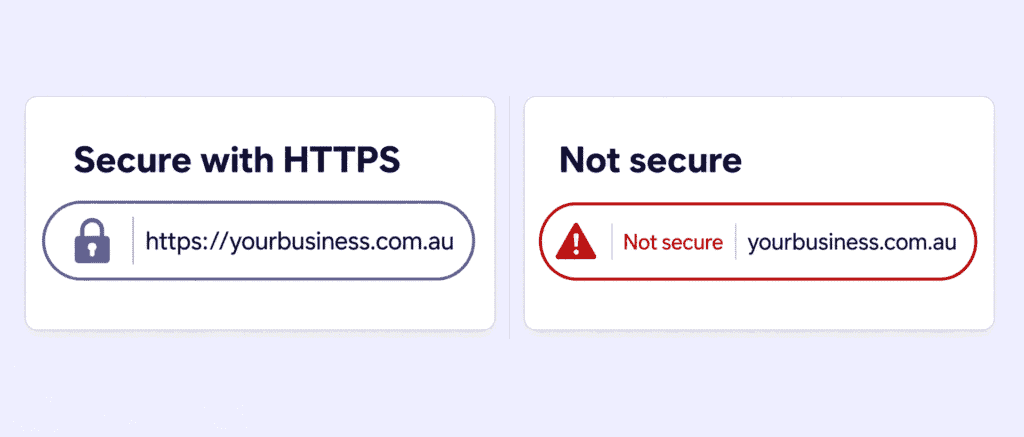
An SSL certificate is what enables HTTPS (Hypertext Transfer Protocol Secure) on your website. Without it, your site runs on plain HTTP, and that causes four problems:
- Visitors get warned away. Browsers display a prominent “Not secure” warning, and often a full-page interstitial that most people won’t click past.
- Data is exposed. Anything typed into a form, contact details, logins, payment information, travels in plain text and can be intercepted.
- You lose credibility. The padlock beside a web address has become the baseline signal that a site is legitimate.
- You lose search visibility. Google treats HTTPS as a ranking signal, so an unsecured site is at a disadvantage.
If you collect any information at all, even just an enquiry form, you need one.
How does an SSL certificate work?
When someone visits your site, their browser and your server perform a quick handshake. The browser checks that your certificate is valid and issued by a trusted Certificate Authority, then the two sides agree on encryption keys for the session. From that point on, everything exchanged is encrypted. The whole process takes milliseconds.
Types of SSL certificate: coverage
The first choice is how much you need the certificate to cover:
| Type | What it covers | Best for |
| Single domain | One domain only (e.g. yourbusiness.com.au) | A single website |
| Wildcard | A domain plus all of its subdomains | Sites with shop., blog., mail. subdomains |
| Multi-domain (SAN) | Several separate domains on one certificate | Businesses running multiple websites |
Types of SSL certificate: validation level
The second choice is how thoroughly the Certificate Authority verifies who you are. An important point that often gets misreported: all three levels provide exactly the same encryption strength. What differs is the depth of identity checking behind the certificate.
| Level | What’s verified | Issued in | Best for |
| DV (Domain Validation) | That you control the domain | Minutes | Blogs, brochure sites, small business websites |
| OV (Organisation Validation) | Domain control plus verified business details | 1-3 days | Business sites, portals with logins |
| EV (Extended Validation) | Full vetting: registration, trading history, phone verification | Up to a week | Banks, financial services, large enterprises |
A note on EV certificates. These were once prized for the green address bar showing your company name but major browsers removed that display back in 2019. EV still signals a rigorously vetted organisation, and some regulated industries require it, but for most businesses a DV or OV certificate delivers identical protection at a fraction of the cost and effort.
Certificates now expire much faster
This is the change most site owners haven’t caught up with. The CA/Browser Forum, which sets the rules for publicly trusted certificates, has voted to shorten certificate lifetimes dramatically:
| From | Maximum certificate lifetime |
| Previously | 398 days |
| 15 March 2026 | 200 days |
| 15 March 2027 | 100 days |
| 15 March 2029 | 47 days |
The first stage is already in force, so you can no longer buy a multi-year certificate and forget about it. An expired certificate isn’t a minor issue either: visitors are met with a full security warning, and for an online store that means lost sales.
The practical takeaway: renewals now need to be tracked properly, or handled by a provider who manages them for you.
How do I get an SSL certificate?
If your site runs on a website builder, basic SSL is usually included automatically once you publish.
If you have your own hosting and website, you’ll need to obtain a certificate and install it. That’s where we come in: Domain Central offers a range of SSL certificates, and we can install yours for you, even if your hosting is with another provider. We’ll also help you pick the right level rather than upselling you something you don’t need.
Running an online store or handling customer data? Pairing SSL with secure hosting protects your customers at every step.
Frequently asked questions
Is a free SSL certificate good enough? For a simple blog or brochure site, basic DV encryption does the job. Paid certificates add warranty cover, business validation and support, worth having if you handle transactions or customer data.
What happens when my SSL certificate expires? Visitors see a full-page security warning and most will leave immediately. With lifetimes now capped at 200 days, tracking renewals matters more than ever.
Does SSL help my Google ranking? Yes. HTTPS is a confirmed ranking signal, and the browser warnings on unsecured sites drive visitors away regardless.
Do I need SSL if I don’t sell anything online? Yes. Any form on your site sends data, and browsers flag unsecured sites either way.
Need help with your SSL?
Not sure which certificate suits your site, or want someone to handle installation and renewals? Our friendly Australian team can sort it out, get in touch or submit a support ticket from your Client Area.