Have you ever received an email from yourself that you didn’t send? It’s an unsettling feeling. It isn’t a message from a past or future version of you: it’s a scammer forging your email address to send spam or phishing messages to other people. This trick is called email spoofing, and it can damage your reputation, land your domain on spam blocklists, and fool your customers into handing over sensitive information.
The good news: one small DNS record can shut most of this down. It’s called an SPF record, and in this guide we’ll explain what it is, why it matters more than ever, and exactly how to set one up.
What is an SPF record?
An SPF (Sender Policy Framework) record is a type of DNS TXT record that lists the mail servers allowed to send email on behalf of your domain. It’s one of the three core email authentication methods, alongside DKIM and DMARC.
Think of it like a guest list for a private event. When another mail server receives a message claiming to be from you@yourdomain.com.au, it checks your domain’s SPF record to see whether the server that actually sent the message is on the approved list. If it is, the email passes. If it isn’t, the receiving server can treat it as suspicious or reject it. Because a scammer sending from their own server won’t be on your list, SPF makes it far harder for anyone to impersonate your domain.
Why SPF records matter more than ever
SPF used to be a “nice to have”. Today it’s essential, for two reasons.
First, deliverability. Mailbox providers such as Gmail, Outlook and Yahoo use authentication results to help decide whether your email reaches the inbox or the spam folder. A domain with no SPF record simply looks less trustworthy.
Second, new sender rules. From February 2024, Gmail and Yahoo began requiring senders to authenticate their mail and for bulk senders, to use SPF, DKIM and DMARC together. Without valid records, your legitimate emails to customers on those platforms are far more likely to be filtered or bounced.
In short, an SPF record protects both your reputation (scammers can’t easily spoof you) and your reach (your real emails actually get delivered).
How an SPF record works
The whole check happens automatically, in a fraction of a second, every time you send an email:
- You send an email from your domain.
- The receiving mail server looks up your domain’s SPF record in DNS.
- It compares the sending server’s IP address against the approved list in that record.
- Based on the result, pass, softfail or fail, it decides whether to deliver, flag or reject the message.

The anatomy of an SPF record
An SPF record is a single line of text made up of mechanisms (which servers are allowed) and qualifiers (how to treat them). Here’s a real-world example for a domain that sends through both its own server and Microsoft 365:
v=spf1 ip4:203.0.113.10 include:spf.protection.outlook.com -all
The common building blocks work like this:
| Part | What it means |
| v=spf1 | Declares the record version. Every SPF record must start with this. |
| ip4: / ip6: | Authorises a specific IP address or range to send mail. |
| a | Authorises the server(s) listed in your domain’s A record. |
| mx | Authorises the server(s) listed in your domain’s MX records. |
| include: | Authorises another provider’s servers (e.g. your email host). |
| all | The catch-all for every server not already listed. Always comes last. |
Each mechanism can carry a qualifier that tells the receiving server what to do with a match:
| Symbol | Name | Effect |
| + | Pass | Allowed to send. This is the default if no symbol is shown. |
| – | Fail | Not allowed. Reject the message. Used as -all to block everything else. |
| ~ | SoftFail | Suspicious, usually delivered but flagged. Used as ~all while testing. |
| ? | Neutral | No policy. Take no action either way. |
SPF records for common email providers
You usually don’t need to build a record from scratch: your email provider gives you an include: value to drop in. Here are the most common ones:
| Email provider | Recommended SPF record |
| Titan Mail | v=spf1 include:spf.titan.email ~all |
| Microsoft 365 | v=spf1 include:spf.protection.outlook.com -all |
| Google Workspace | v=spf1 include:_spf.google.com ~all |
If you send through more than one service, say, Microsoft 365 plus a marketing platform, you combine them into a single record rather than publishing two (more on that below).
How to add an SPF record to your DNS
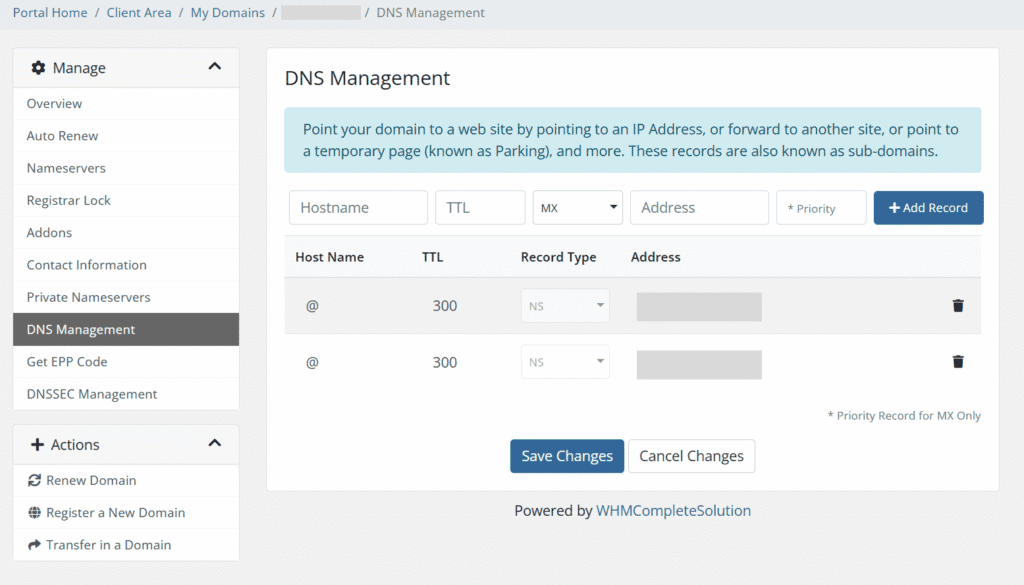
Since an SPF record is a DNS record, you add it wherever you manage your domain’s DNS: your registrar, web host, or a service like Cloudflare.
- Log in to your DNS management tool and choose to add a new record.
- Set the Type to TXT (not “SPF”, that record type is deprecated).
- Set the Name/Host to @ (or leave it blank) so it applies to your root domain.
- Paste your SPF value into the Value/Content field.
- Set the TTL to 1 hour (3600 seconds) and save.
Changes can take a few hours to propagate across the internet. If you’re a Domain Central customer, you can manage all of this from your Client Area.
Common SPF mistakes to avoid
- Publishing more than one SPF record. A domain must have exactly one. Two or more will cause authentication to fail. Merge multiple providers’ include: values into a single line instead.
- Exceeding the 10-lookup limit. SPF allows a maximum of 10 DNS lookups. Chaining too many include: statements will break the record.
- Using +all. This authorises anyone to send as your domain, the exact opposite of what you want. Never use it.
- Choosing the wrong ending. Use ~all (softfail) while testing, then tighten to -all (hardfail) once you’re confident every legitimate sender is listed.
SPF is one piece of the puzzle
SPF is powerful, but on its own it doesn’t cover everything, for instance, it doesn’t protect the “From” address your recipients actually see. For full protection, pair it with DKIM (which digitally signs your messages) and DMARC (which tells servers what to do when a check fails). Together, these three make up a complete email authentication setup.
Frequently asked questions
Do I really need an SPF record? Yes. Without one, your emails are more likely to land in spam, and your domain is far easier to spoof. Since 2024, the major mailbox providers effectively require it.
Can I have more than one SPF record? No, only one per domain. Combine multiple senders into a single record using several include: values.
Will an SPF record stop all spam pretending to be me? It stops most domain spoofing, but it works best alongside DKIM and DMARC. It won’t filter the spam that arrives in your own inbox. That’s a separate job.
Need a hand?
Not sure which SPF record your email setup needs? Domain Central can work it out for you. Get in touch, or open a support ticket from your Client Area, and our friendly team will help you get set up.