Most failed domain transfers fail for dull reasons. The approval email goes to an address nobody has opened since a staff member left. The domain is still locked at the old registrar. Both take minutes to fix before you start and days to untangle once a transfer has stalled.
Other problems take longer. If the domain sits in a former web designer’s name, or your .com.au is still licensed to an ABN that was cancelled in a restructure, fixing it needs a formal change of registrant, sometimes with a chain of title check. That means signed documents and a fee, so it pays to find out before you start the transfer.
This checklist covers what to confirm before you move a .au or .com domain to a new provider, how the two transfer processes differ, and the order that keeps your website and email running while it happens.
What does a domain transfer actually move?
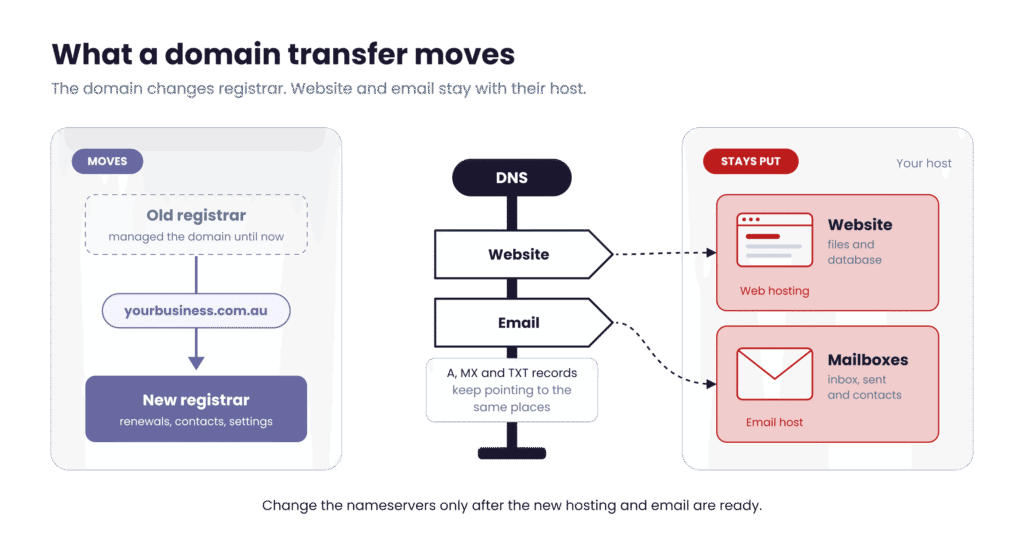
A domain transfer moves the management of your domain from one provider (your registrar) to another. From then on, the new registrar handles renewals, contact details and settings. Your website files and mailboxes stay with whoever hosts them, and your DNS records keep sending visitors and email there.
“Domain transfer” gets used for two different jobs, and they need different checks:
| Type of transfer | What changes | Example |
| Registrar transfer | The provider that manages the domain | Moving yourbusiness.com.au from your old registrar to Domain Central |
| Registrant transfer (change of owner) | The person or company that holds the domain | Selling your business, or moving the domain from a sole trader ABN to a new company |
Most of this post deals with registrar transfers. Registrant transfers have their own section below.
How are .au and .com transfers different?
.au domains (.com.au, .net.au, .org.au, .asn.au, .id.au and direct .au) follow auDA’s Licensing Rules. .com and other generic domains follow ICANN’s Transfer Policy. The rules differ in ways that change your planning:
| .au domains | .com and other generic domains | |
| Rules set by | auDA | ICANN |
| Cost of moving registrars | No transfer fee under auDA rules | Usually includes a paid one-year renewal |
| Extends your term | No | Yes, by one year in most cases |
| When you can transfer | Any time during the licence period | Not within 60 days of registration or a previous transfer (dropping to 30 days as registrars adopt ICANN’s updated policy) |
| Eligibility check | Yes, you must still be eligible to hold the name | No |
| What blocks a transfer | An open complaint, auDRP dispute or court case | A registrar lock, the 60-day window, a UDRP dispute or unpaid fees |
| How long it takes | Up to 3 days once approved | Usually 5 to 7 days |
Source for the .au column: auDA, Transfer your .au domain name.
The pre-transfer checklist
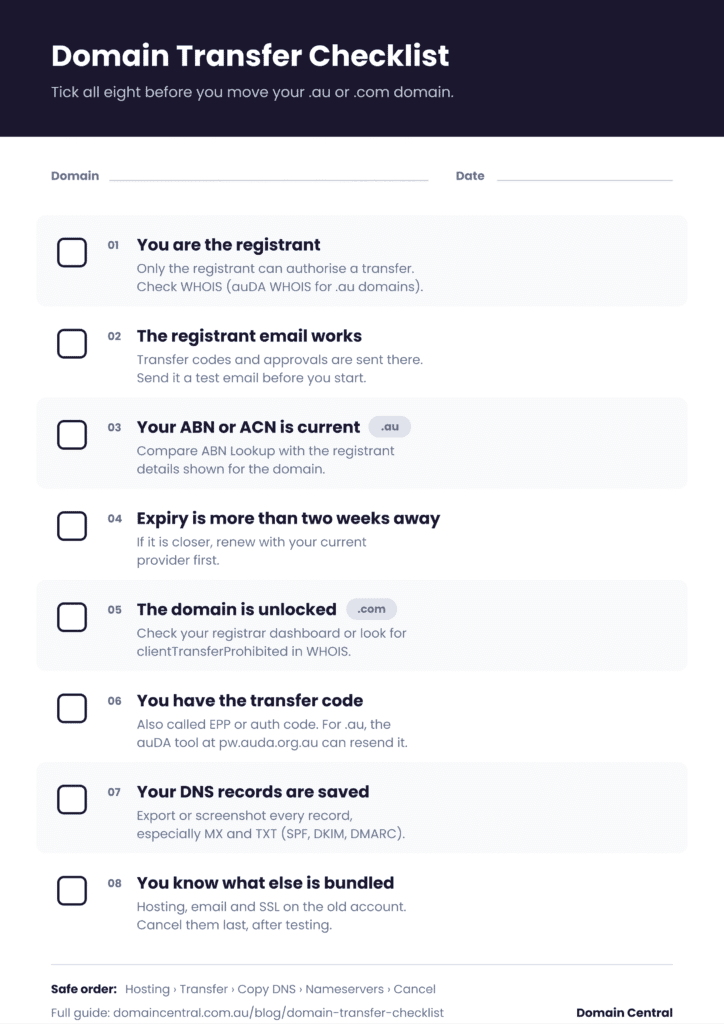
Work through these eight checks before you request a domain transfer. Most take a minute.
| # | Check | Why it matters | How to check |
| 1 | You are the registrant | Only the registrant can authorise a transfer | auDA WHOIS for .au, any WHOIS tool for .com |
| 2 | The registrant email works | Transfer codes and approval emails go there | WHOIS shows the contact; send it a test email |
| 3 | Your eligibility is current (.au) | A cancelled or mismatched ABN can stop the transfer | Compare ABN Lookup with the registrant details |
| 4 | Expiry is not close | A transfer that runs past expiry can stall | Your current registrar’s dashboard |
| 5 | The domain is unlocked (.com) | A locked domain cannot leave its registrar | Registrar dashboard, or WHOIS status “clientTransferProhibited” |
| 6 | You have the transfer code | The new registrar needs it to request the move | Your current registrar, or auDA’s password recovery tool for .au |
| 7 | Your DNS records are saved | They may disappear when you close the old account | Export the zone file or screenshot every record |
| 8 | You know what else is bundled | Hosting, email and SSL often share the old account | Last year’s invoices from the old provider |
Four of these catch people out more than the rest.
Check who the registrant really is
Agencies and web designers often register a client’s domain in their own name or account. If the WHOIS record shows them as registrant, the domain is licensed to them, and the registrant has to be changed to your business before you can move it. This is a formal change of registrant, signed by both parties. For .com.au and .net.au, the registrant should be the legal entity that runs the business, with an ABN or ACN that meets .au eligibility.
Make sure the registrant email still works
For .au domains, your current registrar sends the transfer code to the registrant email held in the .au registry. auDA calls this code the domain password or EPP authInfo code, and it is separate from your account login. If that email belongs to an ex-employee or an old ISP address, update the contact at your current registrar first. A role address such as domains@yourbusiness.com.au avoids the problem next time.
Renew first if expiry is close
If your domain expires within the next two weeks, renew it with your current provider before you start. A .com transfer normally adds a year, but a transfer that stalls past the expiry date leaves you scrambling. A .au transfer adds no time at all, so moving a name with a week left only moves the deadline to a new account. Our guide to domain renewal explains what happens if you miss it.
Save your DNS records before you leave
This is the biggest downtime risk. Many registrars host DNS for free, and if your nameservers point at the old registrar, closing that account deletes your records. Your website stops loading and email starts bouncing. Copy every record, especially MX records for mail delivery and the TXT records for SPF, DKIM and DMARC. DNS 101 explains what each record does.
Will my website and email go down during the transfer?
No, as long as your DNS stays put. The transfer changes the registrar on record and leaves your nameservers alone. Outages happen when someone switches nameservers before the new hosting is ready, or cancels an old account that was still serving the website, the mailboxes or the DNS.
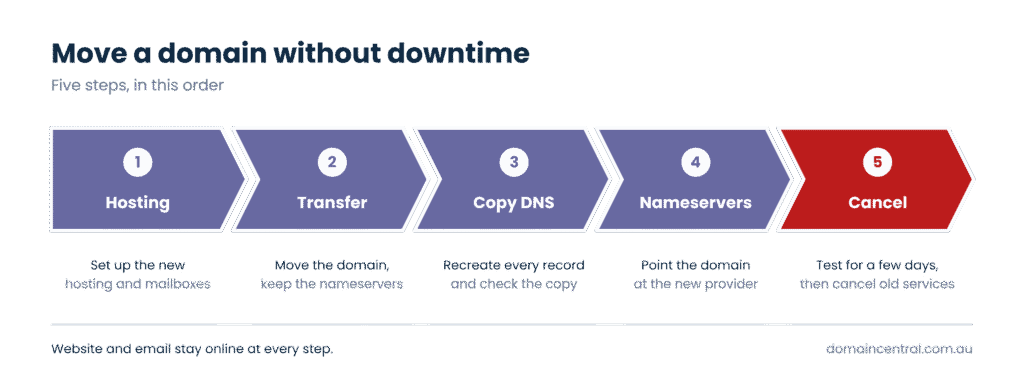
If you are moving hosting and email too, this order keeps everything online:
- Set up the new hosting and mailboxes first, for example WordPress Hosting and Titan Mail.
- Transfer the domain and leave the nameservers unchanged.
- Recreate your DNS records at the new provider and check them against your saved copy.
- Switch the nameservers.
- Test the website and send email to and from an outside address. Cancel the old services only after a few days without problems.
Transferring a domain when you buy or sell a business
Buying a business does not transfer its domain automatically, and the most common mistake we see is doing the wrong kind of transfer. Two shortcuts leave the domain with the seller:
- Moving the domain into the buyer’s registrar account. That is a registrar transfer. It changes who manages the domain, and the seller is still the registrant.
- Updating the name, email or phone number in the registrar account. That changes the contact details. The licence still belongs to the seller.
In both cases the seller still holds the licence on paper. If their ABN is later cancelled, the domain no longer meets the eligibility rules and can be cancelled, and the buyer has no paperwork to prove it is theirs.
For .au domains, what you need is a change of registrant. Both parties sign the required documents, the registrar validates both of them, and the buyer enters a new licence agreement, must meet the eligibility rules and pays the licence fee. auDA requires this to happen within 28 days of the sale contract, unless the contract sets a different timeframe.
Only full years carry over, up to five. A licence with three years and two months left moves to the buyer with three years. Most providers, including Domain Central, charge a fee for a change of registrant, because collecting signed documents from both parties and checking their eligibility takes time.
List every domain in the sale agreement, including old brand names and defensive registrations. For .com domains, the change of owner happens at the registrar. Under the older ICANN rules this can trigger a 60-day lock before the domain can move registrars, so make the ownership change after any registrar transfer, not before.
What to do after the transfer
The transfer is complete when WHOIS shows your new registrar. Then:
- Turn on auto renewal and check the card on file.
- Update the registrant and admin contacts to a role email address.
- Switch the transfer lock back on for .com domains and enable two-factor login on your account.
- Check whether you also hold the matching direct .au. The Australian Cyber Security Centre has recommended that businesses with a .com.au register the matching .au so nobody else can use it to impersonate them.
Moving your domain to Domain Central
Domain Central transfers .au and global domains, and you can manage the domain, WordPress Hosting and Titan Mail in one client area, so you can see what renews when without logging in to three different providers. Our support team is available 24/7 if a transfer stalls.
Not sure your domain is ready? Send us the domain name and we will run through the checklist with you before you start. When you are ready, transfer your domain with your domain password.
Frequently asked questions
How long does a .com.au transfer take?
Once the new registrar has approved the request, a .au transfer can take up to three days to take effect, according to auDA. Most finish sooner.
Does it cost anything to transfer a .au domain?
auDA charges no fee for moving a .au domain between registrars. A change of owner is different: the new registrant pays the licence fee, and most providers, including Domain Central, charge a processing fee because both parties have to complete and sign the required documents.
Can I transfer a domain I registered last month?
A .au domain, yes, as long as it is not subject to a complaint or dispute. A .com domain usually has to wait 60 days after registration, or 30 days once your registrar applies ICANN’s updated policy.
What is an EPP code?
An EPP code (also called an auth code, authInfo code or domain password) is a unique password for one domain. It proves to the new registrar that you are allowed to move it. It is not your account login.
Can I transfer an expired domain?
Renew it with your current provider first. Expired domains are often blocked from transferring, and every day past expiry brings you closer to losing the name.