You can set up SPF. You can set up DKIM. And a scammer can still send an email that lands in your customer’s inbox with your business name in the “From” field.
That gap is what DMARC closes. It is the third and final piece of email authentication, and since 2024 it has quietly gone from optional to expected. Gmail, Yahoo and Outlook all now check for it. In this guide we will cover what DMARC is, what a DMARC record actually says, and how to roll one out without accidentally blocking your own invoices.
What is DMARC?
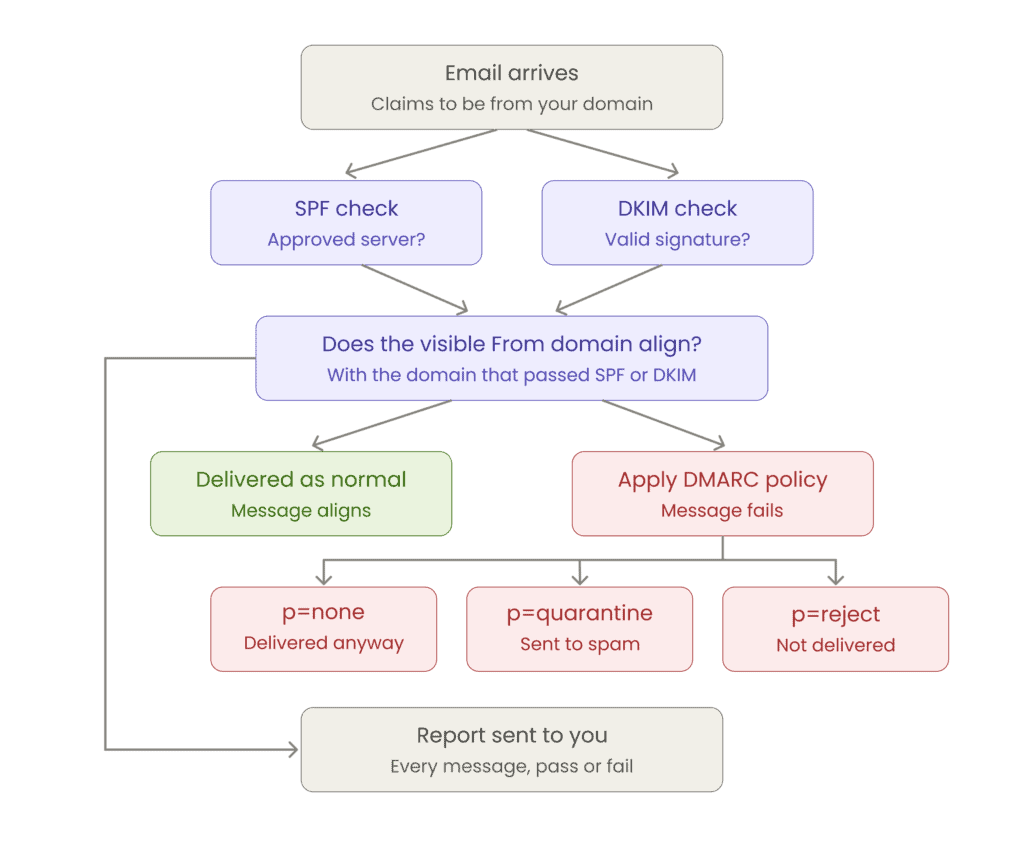
DMARC stands for Domain-based Message Authentication, Reporting and Conformance. It is a text record in your domain’s DNS that tells receiving mail servers what to do with an email that claims to come from your domain but fails its authentication checks: let it through, send it to spam, or reject it outright.
DMARC does not replace SPF and DKIM. It sits on top of them and adds two things neither can do on its own.
The first is alignment. SPF checks the hidden envelope address that mail servers use behind the scenes, not the “From” address your customer actually reads. A scammer can pass SPF for their own domain while displaying yours. DMARC insists that the visible “From” domain matches the domain that passed SPF or DKIM, which is what finally protects the part of the email a human being looks at.
The second is reporting. Once DMARC is switched on, mail servers around the world send you regular reports on every message sent using your domain. For most businesses this is the first time they see the full picture, including the marketing platform someone in the team signed up for two years ago.
How the three records work together
| Record | What it checks | What it cannot do |
| SPF | Whether the sending server is on your approved list | Does not check the “From” address your reader sees |
| DKIM | Whether the message carries your valid digital signature | Does not tell servers what to do if the signature is missing |
| DMARC | Whether the visible “From” domain matches an authenticated domain, and instructs the server what to do when it does not | Does nothing without SPF or DKIM in place first |
The order matters. SPF and DKIM come first. DMARC without at least one of them underneath is a record that reports on nothing.
Why DMARC matters more than it did two years ago
Three things changed.
Mailbox providers now require it. From February 2024, Gmail and Yahoo required bulk senders to publish a DMARC record. Microsoft followed on 5 May 2025 for anyone sending 5,000 or more messages a day to outlook.com, hotmail.com or live.com addresses. Non-compliant mail is rejected with a 550 5.7.515 error rather than quietly filtered. Even a policy of p=none satisfies the requirement, so there is no reason to be caught out by it.
Business email compromise is expensive in Australia. The ASD’s ACSC reported almost $84 million lost by Australian businesses to BEC scams in 2023-24, at an average of around $55,000 per business. The ACSC’s own guidance to small businesses is to ask your provider about SPF, DKIM and DMARC records.
Deliverability follows reputation. An authenticated domain is a trusted domain. Businesses often set up DMARC to stop spoofing and find that their own quotes and invoices stop landing in junk folders as a side effect.
What a DMARC record looks like
A DMARC record is a TXT record published at _dmarc.yourdomain.com.au. Here is a sensible starting record:
v=DMARC1; p=none; rua=mailto:dmarc-reports@yourdomain.com.au;
The tags are readable once you know them:
| Tag | What it does | Example |
| v | Version. Always DMARC1 | v=DMARC1 |
| p | Your policy for the main domain | p=quarantine |
| rua | Where aggregate reports are sent | rua=mailto:you@yourdomain.com.au |
| sp | A separate policy for subdomains | sp=reject |
| np | Policy for subdomains that do not exist | np=reject |
| adkim | DKIM alignment, relaxed (r) or strict (s) | adkim=r |
| aspf | SPF alignment, relaxed (r) or strict (s) | aspf=r |
Only v and p are required, but a record without rua is a wasted opportunity. The reports are the whole point of starting at p=none.
One change worth knowing about. On 20 May 2026 the IETF published RFC 9989, 9990 and 9991, which update DMARC and move it onto the Standards Track, replacing the original 2015 specification. Among the changes, the pct= tag has been deprecated, along with rf= and ri=. Plenty of older guides still tell you to roll out with pct=25. Skip that advice and use the three policies below instead.
The three DMARC policies
| Policy | What receiving servers do | When to use it |
| p=none | Deliver as normal, but send you reports | Weeks 1 to 4, while you find every legitimate sender |
| p=quarantine | Send failing mail to the spam folder | Once your reports are clean, as a safety net |
| p=reject | Refuse failing mail entirely | The goal. Nothing that fakes your domain gets delivered |
p=none protects nobody. It is a monitoring mode, not a destination. If your record has said p=none for a year, a scammer can still spoof you and every message will be delivered. Australian small businesses very commonly stall here.
How to set up DMARC, step by step
- Get SPF and DKIM working first. DMARC has nothing to evaluate without them. Our SPF guide covers the first, and our post on spoofed emails covers the second.
- Create a mailbox for the reports, such as dmarc-reports@yourdomain.com.au. They arrive as XML attachments and there can be a lot of them.
- Add the TXT record. In your DNS panel, create a TXT record with the host _dmarc, paste in v=DMARC1; p=none; rua=mailto:dmarc-reports@yourdomain.com.au; and set the TTL to one hour.
- Wait and read. Give it two to four weeks. The reports will show every service sending as your domain, including ones you had forgotten about, such as your accounting software, booking system or newsletter tool.
- Fix the gaps. For each legitimate sender that is failing, add it to your SPF record or enable DKIM signing for it.
- Tighten to p=quarantine, watch for a fortnight, then move to p=reject.
Checking your record
Before you touch anything, find out what is already there. Free DMARC lookup tools such as those from MXToolbox, EasyDMARC or dmarcian will read your published record and flag syntax errors. Run a lookup on your domain now, and again after every change.
The raw XML reports are hard to read by hand. If you are managing more than a couple of domains, a DMARC reporting service will turn them into a dashboard.
Common DMARC mistakes
- Publishing two DMARC records. A domain must have exactly one. Two means the check fails.
- Putting the record at the wrong host. It belongs at _dmarc, not at @ like your SPF record.
- Jumping straight to p=reject. Without a monitoring period you will block your own mail, and you may not find out for days.
- Leaving rua off. No reports means no way to know whether it is safe to tighten the policy.
- Forgetting your subdomains. Use sp= and np= so invoices.yourdomain.com.au is covered too.
- Setting it and forgetting it. Every new tool that sends mails as your domain needs to be added.
Frequently asked questions
Do I need DMARC if I only send a few emails a day? The bulk sender rules will not apply to you, but spoofing does not care about your volume. Any domain can be forged, and a small business with a good local reputation is a useful thing to impersonate.
Will DMARC stop spam arriving in my inbox? No. DMARC protects your domain from being used by others. It stops people receiving fakes that appear to come from you, including the ones that end up back in your own inbox.
Is DMARC free? Yes. It is a DNS record, so there is no licence or fee. Only the optional reporting dashboards cost anything.
How long does the rollout take? Most small businesses go from p=none to p=reject in four to eight weeks. The time is spent reading reports and fixing legitimate senders, not on the record itself.
We can set DMARC up for you
If you would rather not work through XML reports, our 24/7 support team can do it for you. We will check your existing SPF and DKIM records, publish your DMARC record, and help you move safely from monitoring to full enforcement.
If your email is hosted with us on Titan Mail or Microsoft 365, open a support ticket from your Client Area and we will configure all three records. If someone else manages your DNS, we will supply the exact values for you to pass along.