WordPress runs on almost any web server, so nearly every Australian host sells a “WordPress plan”. Some of those plans are ordinary shared hosting with a one-click installer. Others are set up for WordPress, with a current PHP version, a staging site and backups you can restore yourself. The plan names look alike. The spec sheet tells you which one you are buying.
This guide covers how to read that spec sheet, which plan size suits which kind of site, and what changed for WordPress hosting in 2026. If you are still comparing hosting in general, start with our guide to the best Australian web hosting for small business, which covers renewal prices and server location.
What does WordPress hosting add over ordinary hosting?
WordPress hosting is shared or cloud hosting configured for WordPress, with tools for the jobs WordPress owners otherwise do by hand: updates, testing changes, malware checks and restores. WordPress itself is the same on both. The host’s tools decide how much of the upkeep you do yourself.
| Job | Ordinary shared hosting | WordPress hosting |
| Installing WordPress | Manual or through an installer | Pre-installed or one click |
| Core, plugin and theme updates | You, from the WordPress dashboard | Managed from one screen, can run automatically |
| Testing a change | Straight on the live site | On a staging copy, then pushed live |
| Malware scanning | Often an add-on | Included |
| Backups | Varies, often weekly | Daily, with self-service restore |
| Server settings | Generic | PHP version and limits suited to WordPress |
New to the platform itself? WordPress 101 explains what WordPress is and how to build a first site.
Which PHP version should your WordPress host run in 2026?
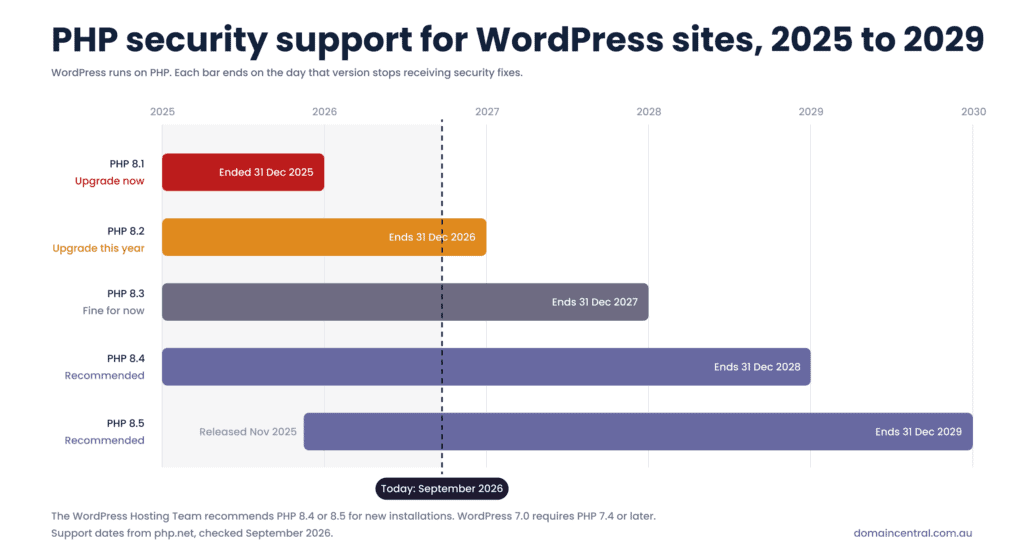
PHP 8.4 or 8.5 for a new site. PHP is the programming language WordPress runs on, and each version gets security fixes for a fixed period. After that, security holes found in it stay open.
WordPress 7.0 was released on 20 May 2026 and raised the minimum PHP version to 7.4. For new installations, the WordPress Hosting Team now recommends PHP 8.4 or 8.5. PHP 8.1 stopped receiving security fixes on 31 December 2025, and PHP 8.2 follows at the end of this year.
| PHP version | Security support ends | What to do |
| 8.5 | 31 December 2029 | Good choice for a new site |
| 8.4 | 31 December 2028 | Good choice for a new site |
| 8.3 | 31 December 2027 | Fine for now, plan the upgrade |
| 8.2 | 31 December 2026 | Upgrade before the end of the year |
| 8.1 and older | Already ended | Upgrade now |
Before you sign up, ask two questions. Which PHP versions can I choose? Can I switch versions myself from the control panel, or do I need to raise a ticket? Then test any PHP change on a staging copy first, because an old plugin or theme is the usual reason a site breaks after an upgrade.
How do you read a WordPress hosting spec sheet?
Four numbers decide how your site copes with visitors: memory, CPU, I/O speed and storage. “Unlimited bandwidth” appears on almost every plan and tells you little, because the other four limits cap your site long before bandwidth does.
| Spec | What it means | What a small business site needs |
| Memory (RAM) | How much work WordPress can hold at once. Page builders and WooCommerce use more. | 1GB for a brochure site, 2GB or more for a shop |
| CPU | Your share of a processor core. 100% is one full core, 400% is four. | More cores let more visitors load pages at the same moment |
| I/O speed | How fast the server reads and writes files and the database | Matters most for shops, bookings and membership sites |
| Storage | Files, images, database and backups kept on the account | Images take most of it, so compress them before uploading |
If terms like “core” and “server” are new to you, Servers 101 explains them in plain English.
Also ask how the host handles caching. Some servers cache pages themselves. Others expect you to install and configure a caching plugin. Either works, but you should know which one you are getting.
Managed or unmanaged: who presses “Update”?
On unmanaged hosting, you run updates, security settings and restores yourself. On managed WordPress hosting, the provider looks after the server, security patching and backups, and gives you tools to update WordPress from one screen.
“Managed” rarely means someone checks your site after every plugin update, though. Most managed plans still leave the decision to update, and the job of checking the result, with you. If you want a person to handle updates, fix what breaks and keep an eye on uptime, that is a maintenance service on top of hosting, such as our WordPress Maintenance and Support.
Whoever runs the updates, protect the admin login with a unique password and two-factor authentication. Password 101 shows how to create one you can remember.
Which plan size fits your site?
Size the plan by what your site does. A 40-page brochure site can need fewer resources than a 10-product WooCommerce store, because every checkout runs database queries that a static page does not.
Here is how our own plans map to common small business sites. Prices are in Australian dollars at the time of writing.
| Type of site | Example | Plan | Monthly / yearly | Memory | CPU | Storage |
| Brochure or landing page | Plumber, physio, accountant | WordPress Starter | $15 / $180 | 1GB | 100% | 10GB |
| Blog, lead forms, booking plugin | Consultancy, studio, clinic | WordPress Business | $25 / $300 | 2GB | 200% | 15GB |
| Small WooCommerce store | Local retailer selling online | WordPress Business or Deluxe | $25 to $45 per month | 2GB to 4GB | 200% to 400% | 15GB to 20GB |
| Several sites or a busy shop | Agency, growing store | WordPress Deluxe | $45 / $528 | 4GB | 400% | 20GB |
| Not-for-profit | Club, charity, community group | Community Hosting | Free for eligible organisations |
Every WordPress Hosting plan includes WP Toolkit for one-click updates, staging and cloning, Imunify360 malware scanning, and a free Let’s Encrypt SSL certificate. Annual plans include the first year of a .au domain, subject to auDA eligibility. You can move up a plan as your traffic grows without rebuilding the site, and there is a 30 day money-back guarantee.
Planning an online shop? Our ecommerce web design team builds WooCommerce stores on this hosting.
How long does your host keep backups?
The schedule matters less than the retention period. A daily backup kept for only one day will not help if malware got into your site a week ago, because every copy you can restore already contains it.
Ask how far back you can restore and whether you can do it yourself, without a support ticket. For comparison, this is what our WordPress plans keep:
| Backup | Kept for |
| Daily | 7 days |
| Weekly | 4 weeks |
| Monthly | 6 months |
Before a large change, such as a new theme, a PHP upgrade or a WooCommerce update, make a staging copy or a manual backup as well.
How do you move an existing WordPress site without downtime?
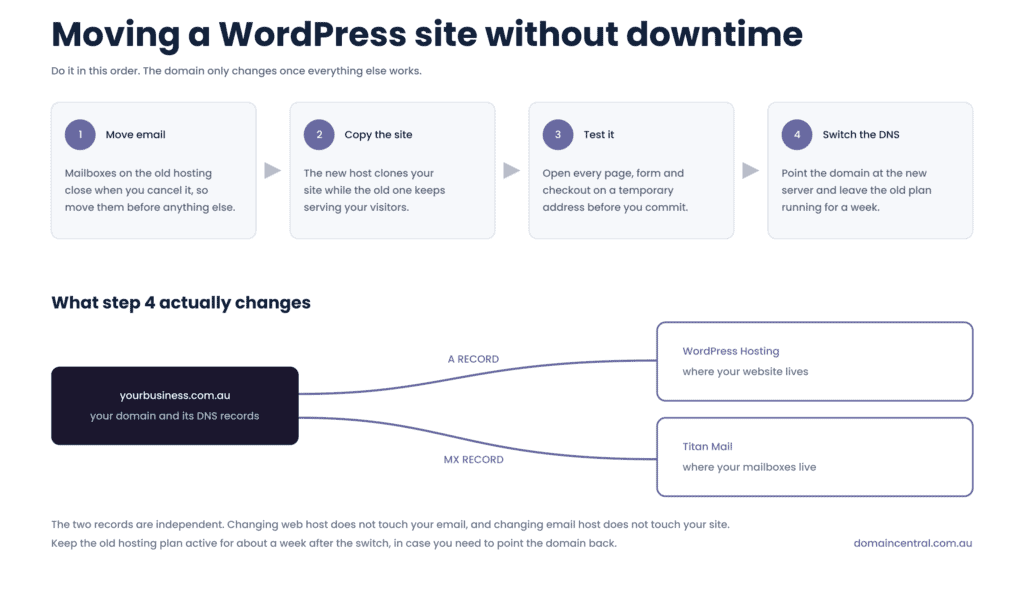
Set up the new hosting first, copy the site across while the old one stays live, test it, and only then point your domain at the new server. Many hosts, including us, will do the copy for free. With Domain Central, you order a plan, raise a migration request with your current host’s login details, and we usually complete the move overnight or at a time you agree.
Two things catch people out:
- Email on the old hosting. If your mailboxes run on your old host’s cPanel, they disappear when you cancel that plan. Move email first, for example to Titan Mail, so it no longer depends on where your website lives.
- Moving everything at once. Keep the domain registration where it is until the website has settled. If you want to consolidate later, a domain transfer is a separate step.
Leave the old hosting running for a week after the switch as a fallback.
Frequently asked questions
Is WordPress hosting worth it over ordinary shared hosting?
If your site runs on WordPress, yes. Staging, one-screen updates and malware scanning cover jobs you would otherwise do by hand, and staging lets you test an update before customers see it.
How much should a small business pay for WordPress hosting in Australia?
Entry-level WordPress plans from Australian providers are commonly advertised between about $7 and $19 a month, often with a lower price for the first term. Compare the price after that first term, then check memory, backups and PHP versions at that price.
Can I run WooCommerce on WordPress hosting?
Yes. A small store suits a plan with 2GB of memory and two CPU cores. If checkout slows down during a sale, that is the signal to move up a plan.
Can I install any plugin or theme I like?
On our plans, yes. You get full WordPress admin access. Some managed hosts block certain plugins, so ask before you move.
Do I need a domain name before I buy hosting?
You need one before the site goes live. Register your domain with the same provider to keep one login and one bill, or consider a shorter .au direct name.
Not sure which plan fits your site? Contact our team and we will recommend one, including when the smaller plan is enough.