For most Australian small businesses, the best email hosting is the cheapest plan that puts your own domain on the address, passes SPF, DKIM and DMARC checks, and gives you support you can reach during your working day. In 2026 that means one of three platforms. Titan Mail suits businesses that only need email. Microsoft 365 suits teams that work in Word, Excel and Teams. Google Workspace suits teams already running on Gmail and Google Drive.
Below you will find current Australian prices, what a five-person team pays per year, and the setup steps. If hosted email is new to you, start with our Email Hosting 101 guide.
Which email hosting suits which business?
| Your situation | Best fit | Why |
| Sole trader with light email | Titan Starter | Own domain, webmail and apps from $2.97 a month |
| Small team answering enquiries | Titan Personal or Business | Advanced anti-spam, 10GB to 50GB per mailbox |
| Team editing Word and Excel files daily | Microsoft 365 Business Standard | Desktop Office apps, Teams, 1TB OneDrive |
| Team already on Gmail and Drive | Google Workspace Business Starter | Familiar Gmail, 30GB pooled storage |
| Contract requires onshore data | Microsoft 365 | Core mailbox data stored in Australia |
How much does business email hosting cost in Australia?
Business email costs between about $3 and $23 a mailbox a month in Australia in 2026. Titan sells email, calendar and contacts on their own, while Microsoft and Google bundle office apps, meetings and cloud storage into the licence.
Microsoft raised its prices on 1 July 2026. Business Basic went from AU$9.00 to AU$10.50 a user a month and Business Standard from AU$18.70 to AU$21.00 (ex GST, annual commitment). Any quote from the first half of 2026 now understates the Microsoft cost.
| Plan | Storage per mailbox | Price per mailbox per month (annual plan) |
| Titan Starter | 5GB | $2.97 |
| Titan Personal | 10GB | $4.95 |
| Titan Business | 50GB | $8.91 |
| Titan Ultra | 100GB | $16.83 |
| Google Workspace Business Starter | 30GB pooled | $10.98 inc GST |
| Microsoft 365 Business Basic | 50GB mailbox, 1TB OneDrive | $11.55 inc GST |
| Google Workspace Business Standard | 2TB pooled | $21.78 inc GST |
| Microsoft 365 Business Standard | 50GB mailbox, 1TB OneDrive, desktop Office apps | $23.10 inc GST |
Microsoft and Google figures are list prices checked in September 2026. Monthly billing and resellers change the final price.
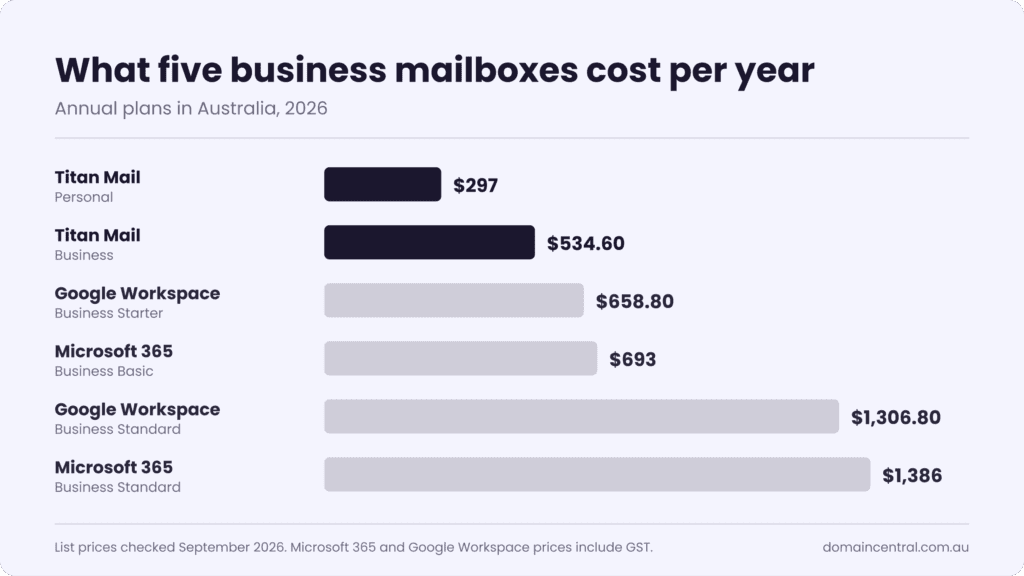
For a five-person team on annual plans, the yearly bill looks like this:
| Plan | Cost per year for 5 mailboxes |
| Titan Personal | $297.00 |
| Titan Business | $534.60 |
| Google Workspace Business Starter | $658.80 |
| Microsoft 365 Business Basic | $693.00 |
| Google Workspace Business Standard | $1,306.80 |
| Microsoft 365 Business Standard | $1,386.00 |
Shared addresses such as info@, sales@ and accounts@ can be aliases that deliver into an existing inbox, so you pay for one mailbox per person who logs in. Annual and two-year Titan Personal, Business and Ultra plans also cover the first-year fee for a new .au, .com.au or .net.au domain, if you meet the eligibility rules.
What makes email hosting “Australian”?
A .com.au website does not mean your email is stored in Australia. Before you sign up, get written answers to four questions.
| Check | Question to ask |
| Data location | Which country stores my mailbox data? |
| Support hours | Can I reach a person during Australian business hours? |
| Billing | Are prices in AUD, and do invoices show GST? |
| Domain | Can I register and renew my .au domain in the same account? |
Titan is a global cloud platform and does not advertise an Australian data centre. For most small teams that makes no practical difference. If a government tender, health client or legal contract says email must stay onshore, choose Microsoft 365, because tenants created in Australia keep core Exchange Online mailbox data in Australian data centres.
Will my emails land in the inbox?
Your DNS records decide inbox placement more than your choice of provider does. Since February 2024, Google and Yahoo have filtered or rejected mail that fails authentication, and Google’s sender guidelines require everyone sending to Gmail to set up SPF or DKIM, whatever their volume. Microsoft started enforcing similar rules for high-volume senders to Outlook.com in May 2025.
Three records do the work:
| Record | What it does | Who sets it up |
| SPF | Lists the servers allowed to send email for your domain | You, using the value your email provider supplies |
| DKIM | Signs each message so receivers can confirm nobody altered it | Your provider generates the key and you publish it in DNS |
| DMARC | Tells receiving servers what to do with mail that fails SPF or DKIM, and sends you reports | You, starting with a monitoring policy |
Titan supports custom SPF and DKIM on every plan, including Starter. When your domain and email sit in the same Domain Central account, you add all three records in one DNS editor. Our guides to SPF records and DMARC give you the exact values to enter.
Titan, Microsoft 365 or Google Workspace?
| Feature | Titan Mail | Microsoft 365 Business Basic | Google Workspace Business Starter |
| Office apps | None | Web and mobile Word, Excel, PowerPoint | Docs, Sheets, Slides |
| Video meetings | No | Teams | Meet |
| Works in Outlook and Apple Mail | Yes | Yes | Yes |
| Onshore data option | Not advertised | Yes | Check with Google |
Choose Titan Mail when email is the job. A plumber or bookkeeper who sends quotes does not need to pay for Excel again, and Titan Business adds read receipts and follow-up reminders for chasing them. Every mailbox on one domain must use the same Titan plan, so pick the tier your heaviest user needs. For a public enquiry address, start at Personal, because Starter does not include advanced anti-spam and anti-virus.
Choose Microsoft 365 when several people edit the same Word and Excel files, when you run meetings in Teams, or when your data has to stay in Australia.
Choose Google Workspace when your team already works in Gmail, Docs and Drive, and retraining would cost more than switching saves.
Should email and website hosting be separate?
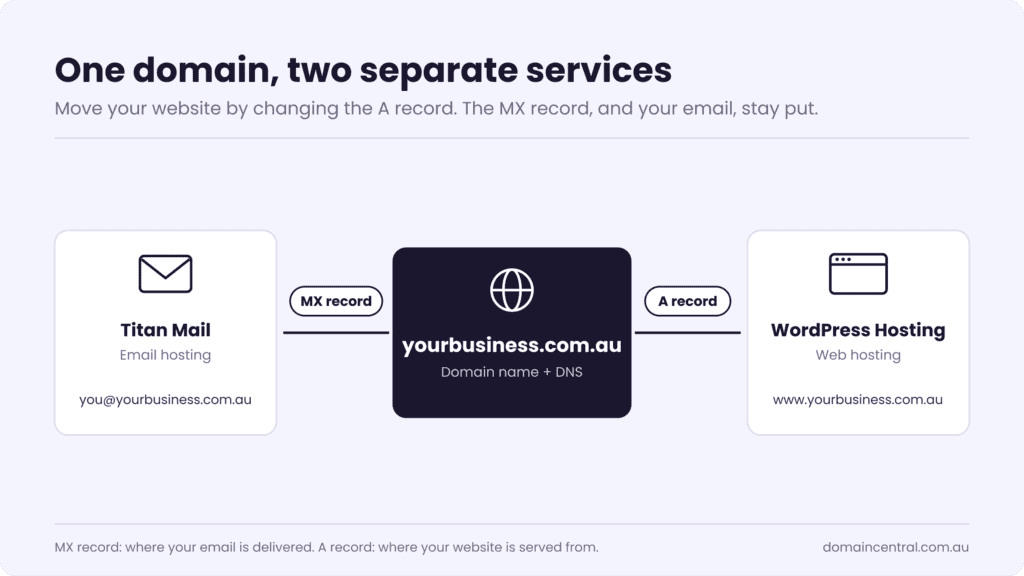
Yes. Keep your domain, website and email as three separate services, even if one company bills you for all of them. Many budget hosting plans run email on the same server as the website. When that server goes down, gets hacked, or you move your site to a new host, your email goes with it.
A dedicated platform such as Titan or Microsoft 365 runs on its own infrastructure. Your MX records point to the email provider and your A record points to your web host, so you can change one without touching the other. You can still keep one login and one bill, with your domain, your site on WordPress Hosting and your Titan inboxes in the same Domain Central account.
How do you set up business email?
Most small businesses finish setup in an afternoon, plus up to 48 hours for DNS changes to reach every network.
- Register your domain or transfer an existing one. A .com.au or .au direct name tells customers you trade in Australia.
- Choose a plan and create one mailbox for each person who needs their own login.
- Add the MX, SPF, DKIM and DMARC records your provider gives you. Our DNS 101 guide explains each record type.
- Import your old emails and contacts with Titan’s one-click import.
- Create aliases for info@, sales@ and accounts@.
- Turn on two-factor authentication and a strong password for every mailbox.
- Send a test to a Gmail and an Outlook.com address and confirm it lands in the inbox.
If your current provider is closing its email service, read what to do when your email service shuts down before you start.
Frequently asked questions
What is the cheapest business email in Australia?
Titan Starter costs $35.64 a mailbox a year on an annual plan at Domain Central, which works out to $2.97 a month. For an address that receives public enquiries, Titan Personal at $59.40 a year adds advanced anti-spam and anti-virus.
Can I use my own domain with free Gmail?
No. Free Gmail does not host mailboxes for your own domain. To send and receive as you@yourbusiness.com.au, you need a paid plan, either Google Workspace or a separate email host such as Titan.
Do I need a website to have business email?
No. You need a registered domain name, and you can add a website later.
Will I lose my email if I change web hosts?
Not if your email runs on a separate platform such as Titan or Microsoft 365. You update the DNS records for your website and leave the MX records untouched.
Get your business email running
Search for your .au domain, pick a Titan Mail plan, and work through the seven setup steps above. On an annual Personal, Business or Ultra plan, the first year of your new .au domain is included. Not sure which plan fits? Contact our team and we will help you choose.